

CSER Guide
Our Mission
We enhance the Liberty experience by producing both in-venue and broadcast excellence.
Department Structure
Administration
- Bobby Keating - Executive Producer
- Sheldon Donigan - Head of Production
- Kate Egan - Assistant Manager
Production Technicians
These are full-time employees that support and carry out events.
- Unit Production Managers (UPMs)
- Production Technicians
- Production Apprentices
Student Workers
Working alongside full-time staff to complete event related tasks.
CSER Students (You)
Assisting the Campus Production team at events.
Key Contacts
| Name | Role | |
|---|---|---|
| Sheldon Donigan | Administration, Workday | sedonigan@liberty.edu |
| Kate Egan | Administration, Workday | kbschultz@liberty.edu |
| Monika Garland | Crewing | broadcast-crewing@liberty.edu |
| Claire Overlie | Crewing | broadcast-crewing@liberty.edu |
| Liam Patterson | UPM | lepatterson1@liberty.edu |
| Chad Mitchell | UPM | cmitchell2@liberty.edu |
| Dan Reid | UPM | dmreid1@liberty.edu |
| Eric Tibbs | UPM | etibbs@liberty.edu |
| Julie Schlenker | UPM | jschlenker1@liberty.edu |
Positions
Production Control Room (PCR)
- Director: Directs broadcast of the event
- Technical Director (TD): Sets up video switcher and switches between cameras and graphics for event
- Mac 1, Mac 2: Content operators, display graphics and lyrics for event
- Video: Adjusts camera colors/brightness (shading) during the event
- Engineer in Charge (EIC): Makes sure equipment is working correctly and routed properly
Venue
- Camera Operator: Operates a camera during an event. Camera positions may include center/slash, handheld (HH), dolly, jib, or Steadicam.
- Utility: Assists camera operators by managing camera cables and pushing the dolly when needed.
- Front of House (FOH): Mixes audio for the audience in the venue.
- Monitors (MON): Mixes in-ear monitors and stage wedges for musicians and on-stage talent.
- Broadcast Audio (BA1): Mixes audio specifically for the broadcast or livestream feed.
- Stage Manager (SM): Oversees all on-stage activity, coordinating people, props, and gear to ensure the event runs smoothly.
- Stagehand: Assists the Stage Manager by moving equipment, props, and other gear on and off the stage.
- Lighting Director (LD): Designs, programs, and operates the lighting for the event.
- LED Operator: Operates the LED wall and manages on-screen visual content during the event.
- Assist: Assists in whatever way is needed that day. May cover for someone who is sick, shadow a position, etc.
Student Expectations
Completing your CSER with our team is an opportunity to learn about in-venue and broadcast production in a professional environment. You’ll have a chance to shadow and assist our team as we create and produce excellent productions.
CSER students begin by shadowing positions they are interested in learning and by serving as a Utility for our camera team. Shadows learn from our audio, lighting, LED, camera, and control room teams. HH and Steadicam Utilities wrap and manage the cable for our mobile camera operators, allowing them to quickly and freely move around the venue. Dolly Utilities smoothly push the dolly cart to assist in creating dolly shots. As students demonstrate abilities for other positions, they may have chances to serve in other capacities.
General expectations
- Please be on time apart from when you have class. If you have an 8:15 a.m. class before Convocation, come after your class. If you have a 9:05 a.m. class, come before class, leave for class, then return afterwards for Convocation.
- All students must register through the CSER portal to shadow Campus Production, regardless if you need CSER credit or not. If you are serving for CSER credit, you can stop at 20 hours or continue serving. Let us know your preference when you reach your hours.
Venue locations
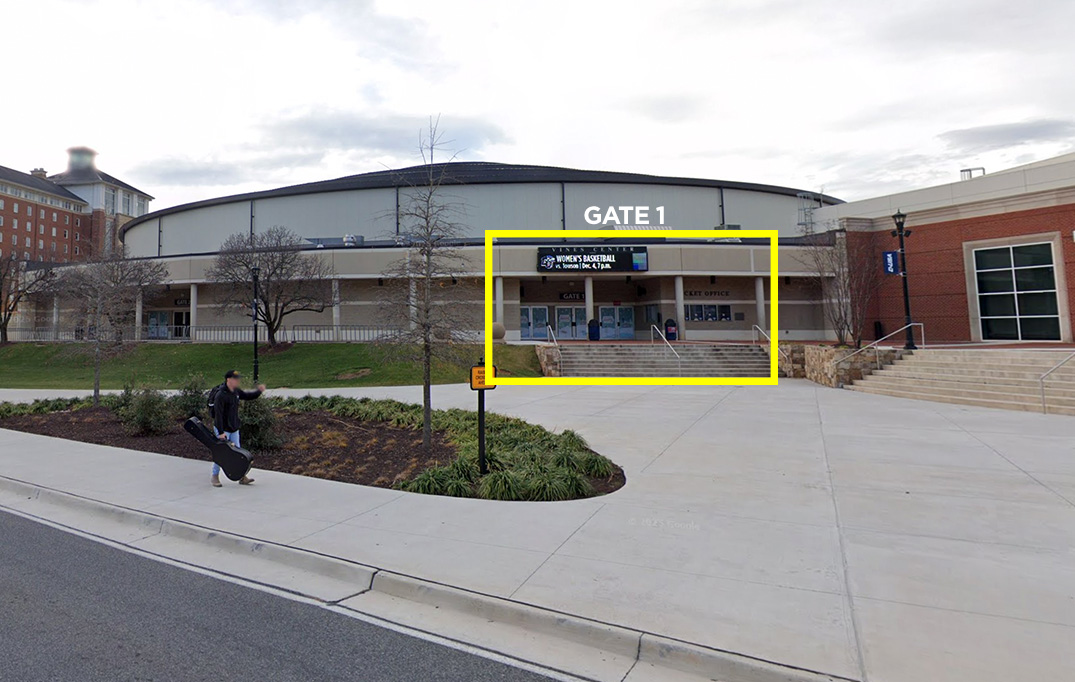
- If you are working at Vines, come to Gate 1, go through security, then come down to the floor where our team will be getting ready for the event. We will meet and get you connected to the position you will be in.
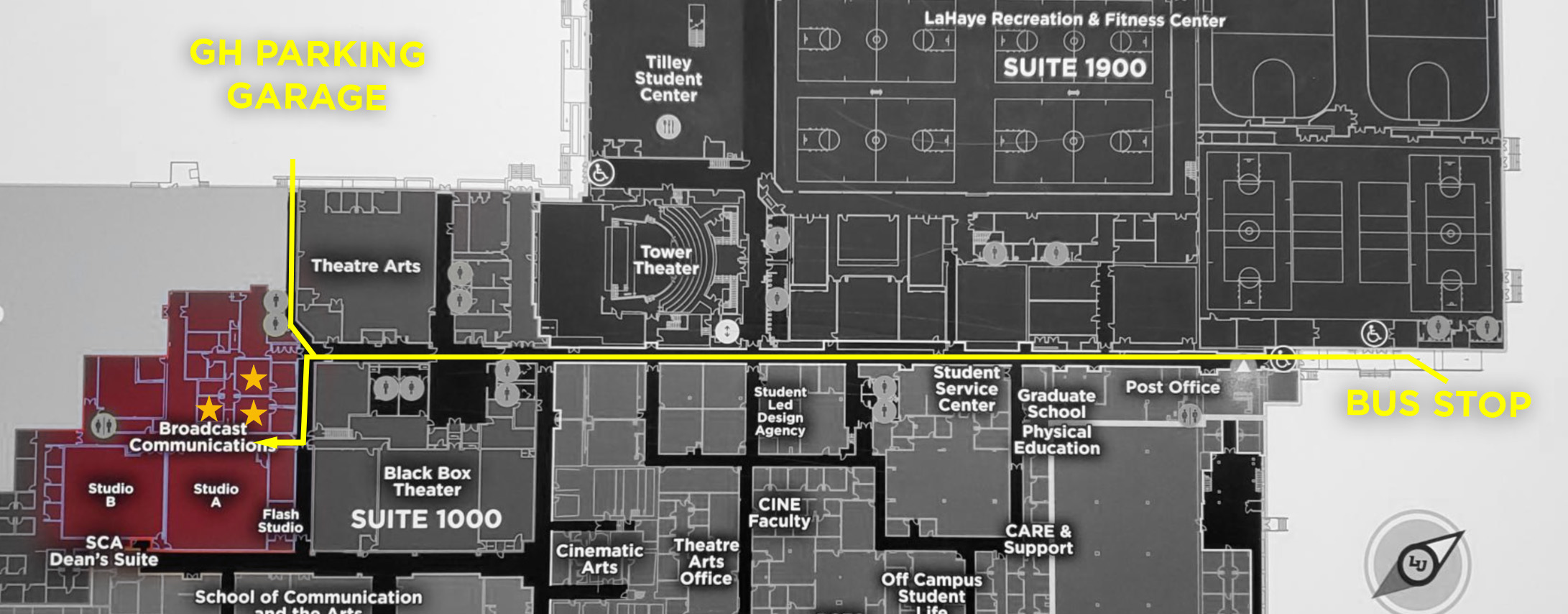
- If you are working in the Green Hall Production Control Rooms (GH PCR), go to the area as shown in the diagram here. If you cannot get in, send a Teams message to the Director.
Scheduling
- We schedule most volunteers once a week at Convocation or Campus Community. This provides 3-4 hours a week (depending on your class schedule). Occasionally we schedule CSER students at other events if it fits their interests and availability better. The call time for Convocation is 8:00 a.m.–12:00 p.m., and the call time for Campus Community is 5:30–9:00 p.m.
- We schedule at least 2 weeks out. You will receive Outlook event invites for when you are scheduled. This invite will contain details including the time, location, and your position.
- When you receive an invite please promptly accept or decline. If you cannot work the event, please decline with a comment with a reason for the decline so we can see your response and re-staff the position.
Appearance and dress
- Jeans/Khaki’s (dark preferred) and solid dark shirt are required when working in a venue. If you are working in a control room, you do not have to wear dark clothes.
- Closed-toed shoes are required for in-venue positions.
- Non-Gym shorts may be worn for outdoor events if indicated in the event call.
Safety
General safety
- Keep aware of your surroundings. We deal with a lot of moving pieces and heavy equipment. Always be alert and aware.
- Treat equipment well, using it wrongly can hurt you or it. It’s also expensive, so if you don’t know how to use it, ask.
- Wear closed toe shoes. Watch out for feet when pushing cases.
- Lift with your legs not your back. Please don’t try to be a hero, if you need help ask for it.
- If you see something that doesn’t seem safe or correct please point it out to a full-time tech.
Rigging safety
- Flown Equipment: Pay attention to when equipment is moving and its proximity to you. Don’t work under someone who is rigging.
- Only full-time staff may operate motor distros. They will call out before moving motors.
- Rigging: When preparing to hang equipment it is important to double and triple check all bolts, spansets, steelflex, shackles and motor hooks for damage and proper assembly.
- All lights that are hung must have a safety attached.
Power Safety
- We work with two power voltages, 120V and 208V. It is imperative that you know what voltage you are plugging in to. When in doubt ASK! Plugging in to the wrong voltage can fry equipment.
- Camlock/Feeder: This is the main source of power into our power distro’s. Make sure power is OFF before plugging/unplugging and call out when you are turning power on/off. When plugging in the order you must follow is, Green>White>Black>Red>Blue. When unplugging the order is, Blue>Red>Black>White>Green. Do not kneel on the ground while plugging in these cables.
Cable Safety
- Run cables neatly together so they can be easily traced and easily coiled at load out.
- Run cables under stage legs, not over them.
- If a cable is in a walk path, it needs to be taped or in a linebacker.
- When pushing cases over a linebacker or a lift gate don’t just ram it or it may flip, push and/or lift it over.